


ecobee
4.411.09K Reviews
App Specs
- Version
- Varies with Device
- Updated On
- License
- Free
- Downloads
- 1,000,000+
- Developer
- ecobee inc.
- Categories
- House & Home
- Platform
- Android, iOS
Screenshots
 Analysis by AppCompare
If you've ever wanted to take control of your home's climate with just a few taps, then let me introduce you to the ecobee app. This nifty tool is like having a smart thermostat right in your pocket, and it's here to make your life a whole lot easier. I decided to give it a whirl, and here's what I found.
What Free Access Means in Practice
The app is free, which makes trying its phone-based controls a low-risk step if you already have a compatible ecobee setup. That price applies to the app itself; it should not be mistaken for a free thermostat or a promise that every part of a smart-home setup costs nothing. The important distinction is that the app is a control point, while the home equipment it works with is a separate consideration.
For me, that changes the value question. If an ecobee thermostat is already part of your home, having its controls on your phone can make the system easier to use without paying to download the app. If you are starting from scratch, first decide whether you want the hardware and the kind of connected climate control it enables. The free app alone cannot replace a thermostat.
Where the App Earns Its Place
Its strongest value is convenience that can become a routine, rather than a novelty you use once. A phone is usually close at hand, so making an adjustment from another room or while away can be simpler than walking to the wall control. That matters most when your plans change: an unexpectedly late return, a day spent at home instead of out, or a household member who wants a different setting.
There is also a practical value in being able to look at energy information and consider how your habits affect use. I would treat those reports as a guide for making choices, not as a guarantee of lower bills. A report is useful when it leads to a change you can sustain, such as reconsidering a schedule that heats or cools the home when nobody needs it. The app is more convincing as a tool for awareness and adjustment than as a promise of savings.
Tradeoffs Before You Depend on It
The biggest tradeoff is that phone control is only useful when the app is connected to the right ecobee equipment and that setup is working as expected. This is not a general-purpose home climate app that can take over any thermostat. If your existing equipment is from another brand, its own app or the physical thermostat may be the more direct choice.
Remote access also changes how you think about a household routine. A schedule can handle predictable days, while manual adjustments are handy when plans change; relying on one approach alone may feel limiting. I would start with the ordinary rhythm of the home, then use remote control for exceptions rather than continually correcting a schedule that no longer fits. That small distinction can make the app feel helpful instead of demanding constant attention.
Worth Reading Before You Choose

EA SPORTS FC Mobile 26 Is a Bigger Football Game, but It Takes Time

Flipboard Shows What News Apps Must Do Beyond the Feed

Switching to Android Auto Means Rethinking Your Driving Routine

Google Calendar Makes a Crowded Week Easier to Manage

Ludo King Makes the Most of the Minutes Between Plans

Baby Panda World Brings Quick Play to Modern Phones, but Its Game Library Feels Busy
Connected-home integration can be a plus if you already use a supported assistant, but it is not automatically a reason to choose the app. The more services and devices you involve, the more you may need to decide where you want to make changes: in the ecobee app, through an assistant, or at the thermostat. If you prefer one clear place to manage everything, keep the setup simple and use only the integrations that make a real daily task easier.
Getting Started with ecobee
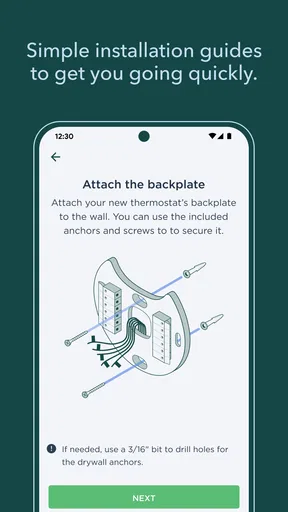
Setting up the ecobee app was a breeze. Once you download it from the App Store or Google Play, the onboarding process guides you through connecting your thermostat to your Wi-Fi network. I loved how the app held my hand through every step, ensuring I didn’t miss a beat. It's perfect for those of us who aren't exactly tech-savvy.
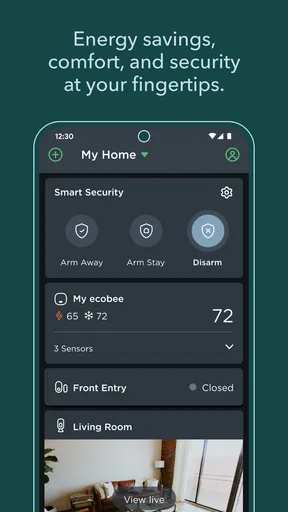
The interface feels pretty intuitive. Everything is laid out clearly, so you can quickly adjust temperatures, set schedules, or even monitor energy usage. I found myself tinkering with the settings just because it was so easy and, dare I say, fun!
Features That Stand Out
One of the standout features has to be the energy reports. The app provides insights into your energy use, helping you make informed decisions about your consumption. It's like having a personal energy consultant whispering advice in your ear.
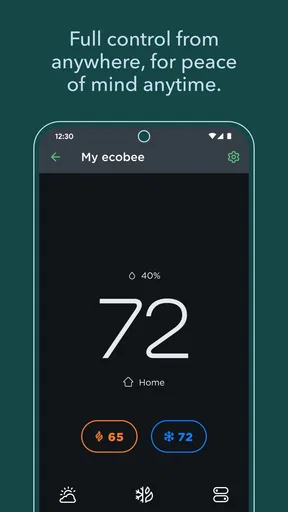
Another feature I loved was the remote control capability. Whether I was lounging on the couch or out for a stroll, I could adjust the temperature with a simple tap. No more getting up to tweak the thermostat manually!
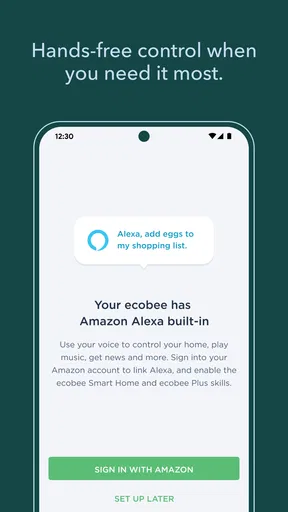
And let's talk about those smart home integrations. Ecobee plays well with others, syncing seamlessly with platforms like Alexa, Google Assistant, and Apple HomeKit. It’s like having your personal assistant to manage your home climate.
Day-to-Day Use
Living with the app day-to-day is a joy. The scheduling feature means I can set it and forget it. My home is always at the perfect temperature when I wake up or get back from work, without me lifting a finger.
And if you're living with others, the app allows for multiple user profiles. It’s great for avoiding thermostat wars—everyone can have their say, and you can find a happy medium.
Everyday Routines and Useful Questions
A realistic use case is a household with a fairly regular weekday routine that occasionally changes. I would set a schedule around the usual morning and evening pattern, then make a temporary adjustment from the phone if work runs late or someone comes home early. That is a more sensible workflow than rebuilding the whole schedule every time the day goes differently. It also gives the household a fallback: anyone who is home can use the thermostat directly if reaching for a phone is inconvenient.
When several people share the home, it helps to agree on who will make lasting schedule changes and who will handle one-off adjustments. Multiple profiles can make shared access more practical, but they do not settle disagreements about the temperature by themselves. I would use the schedule as the household baseline and treat individual changes as exceptions, then revisit the baseline if those exceptions become routine.
People often wonder whether the app is still useful if they already have a smart speaker. In my view, the assistant is convenient for quick commands, while the ecobee app is the more natural place to review settings and energy information. They serve different moments, so using both can make sense; if you rarely use voice control, there is no need to add it just because it is available.
Another reasonable question is whether this replaces the wall thermostat. I would not plan on that: the app adds a remote way to manage the connected system, but a physical control remains useful for guests, family members who do not use the app, or moments when a phone is not to hand. Keeping both options in mind makes the setup more resilient and avoids making everyday comfort depend on one person’s phone.
Who Will Get the Most from It?
I would recommend it most to people who already use ecobee equipment and want to manage home comfort from more than one place. It is especially appealing if your household has changing arrival times, likes to set a regular schedule, or wants a clearer view of energy use. The app’s free download lowers the barrier to exploring those controls, and its Everyone age rating makes it broadly suitable for households, though account and device decisions still belong with the adults responsible for the home.
It is less compelling for someone who prefers a simple manual thermostat and has no interest in remote adjustments, schedules, energy reports, or connected-home controls. It is also not the right first step for a person who expects an app to work with any brand of thermostat. In those situations, sticking with the existing control or choosing the manufacturer’s own app is likely less frustrating than building a setup around equipment you do not have.
Compared with a basic thermostat app, ecobee’s appeal is its combination of climate controls, scheduling, energy information, and links with familiar smart-home assistants. A plain manual control may be easier if you only change the temperature occasionally; a broader home-automation platform may suit someone who wants one place to manage many brands and device types. I would choose ecobee for a home already centered on its equipment, rather than treating it as the universal answer for every smart home.
ecobee inc. develops the app, which sits in the House & Home category. It has a 4.3 average from around 39,000 ratings, with more than 1 million installs, and it is free to download. It has been available since September 29, 2014, and carries an Everyone content rating. Those figures suggest an established app with a substantial audience, but they do not tell you whether it fits your particular thermostat or household routine; that compatibility and day-to-day fit are the more useful checks before you commit.
Final Thoughts
In a world where convenience is king, the ecobee app is a worthy addition to any smart home setup. It's user-friendly, packed with features, and integrates beautifully with other smart systems. If you're looking to save energy and make life a bit easier, it's worth considering—but I would keep expectations grounded: energy information can help you make choices, while the result depends on the choices and setup you maintain.
So, if you're ready to take the plunge, head over to your app store and give ecobee a go. Trust me, your future self will thank you!
Pros
- User-friendly interface for easy navigation.
- Smart scheduling saves energy effectively.
- Integrates well with smart home systems.
- Remote control via mobile app for convenience.
- Detailed energy reports for better monitoring.
Cons
- Initial setup can be a bit complex.
- Requires stable Wi-Fi for full functionality.
- Higher upfront cost compared to basic models.
- Limited compatibility with older HVAC systems.
- Occasional app connectivity issues reported.
FAQs for ecobee
What is the primary function of the ecobee app?
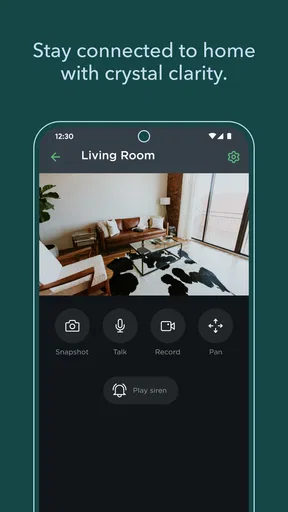
The ecobee app is designed to help users manage and control their ecobee smart thermostats and other connected home devices. Through the app, you can adjust temperature settings, create schedules, and monitor energy usage from your smartphone or tablet, ensuring optimal comfort and efficiency in your home.
Is the ecobee app compatible with all smart home systems?
The ecobee app is compatible with a wide range of smart home systems, including Amazon Alexa, Apple HomeKit, Google Assistant, and Samsung SmartThings. This allows for seamless integration and control of your ecobee devices alongside other smart home products, enhancing the overall user experience and convenience.
Does the ecobee app support multiple users?
Yes, the ecobee app supports multiple users, making it easy for different household members to access and control the thermostat from their own devices. Each user can customize settings and preferences to suit their individual needs, ensuring comfort and convenience for everyone in the home.
How secure is the ecobee app in terms of data privacy?
The ecobee app employs robust security measures to protect user data, including encryption and secure user authentication. ecobee is committed to safeguarding your information and maintaining privacy, ensuring that your personal and usage data remain safe and secure against unauthorized access.
Are there any costs associated with using the ecobee app?
The ecobee app itself is free to download and use. However, owning and operating an ecobee smart thermostat may involve initial purchase costs and installation fees. Additionally, any smart home integrations or features may require subscriptions or further purchases, depending on your specific setup and preferences.


